Density of States Plot
Density of States (DOS) is vary important to understand the electronic structure of the solid, and our GVasp also support its plot.
simple case
Firstly, we start from the Total DOS plot, the files user need to prepare is DOSCAR and CONTCAR, then run command below:
gvasp plot dos -j plot.json --save
The figure is like this:
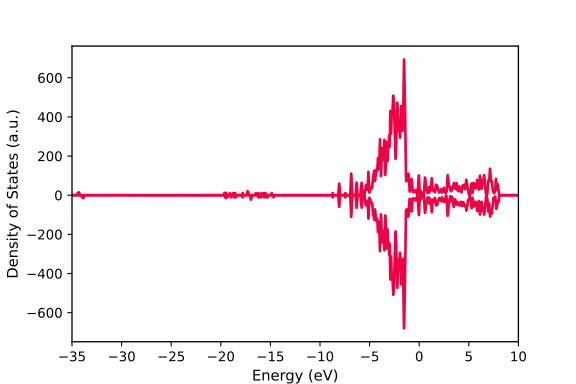
The plot.json is like this:
{
  "width":6,
  "height": 4,
  "fontsize": 10,
  "xlim": [-35, 10],
  "dos_file": ["DOSCAR-test"],
  "pos_file": ["CONTCAR-test"],
  "data": {"0": [{"color": "#ed0345"}]}
}
It can ben seen that, many parameters have been added in plot.json, but actually the dos_file, pos_file and data is required.
dos_file: represents the location of
DOSCAR, should be a listpos_file: represents the location of
CONTCAR, should be a listdata: a dict, key is index of plot DOSCAR/CONTCAR in
dos_file; value is a list, each element represents a line in the figure
Note
dos_file and pos_file should have same length
Therefore, for the simple case, we only added the color to control the line’s color. Very simple, is it?
atoms projection
If we want to plot the projection DOS to some atoms, the plot.json is like this:
{
  "width":6,
  "height": 4,
  "fontsize": 10,
  "xlim": [-35, 10],
  "dos_file": ["DOSCAR-test"],
  "pos_file": ["CONTCAR-test"],
  "data": {"0": [{"atoms":[1, 2, 3, 4, 5], "color": "#ed0345"}]}
}
The figure is like this:
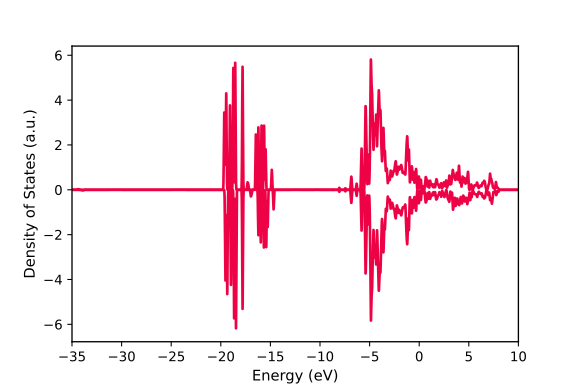
Actually, because the atoms list is continuous, syntactic sugar can be applied, like this
{
  "width":6,
  "height": 4,
  "fontsize": 10,
  "xlim": [-35, 10],
  "dos_file": ["DOSCAR-test"],
  "pos_file": ["CONTCAR-test"],
  "data": {"0": [{"atoms":"1-5", "color": "#ed0345"}]}
}
Particularly, if you want to plot all atoms belonging to one element, you can also applied the syntactic sugar like this
{
  "width":6,
  "height": 4,
  "fontsize": 10,
  "xlim": [-35, 10],
  "dos_file": ["DOSCAR-test"],
  "pos_file": ["CONTCAR-test"],
  "data": {"0": [{"atoms":"O", "color": "#ed0345"}]}
}
Multi-Elements is now also supported, like this:
{
  "width":6,
  "height": 4,
  "fontsize": 10,
  "xlim": [-35, 10],
  "dos_file": ["DOSCAR-test"],
  "pos_file": ["CONTCAR-test"],
  "data": {"0": [{"atoms":["O", "Ce"], "color": "#ed0345"}]}
}
If you want to decomposing to orbitals, add the orbitals parameter, like this:
{
  "width":6,
  "height": 4,
  "fontsize": 10,
  "xlim": [-35, 10],
  "dos_file": ["DOSCAR-test"],
  "pos_file": ["CONTCAR-test"],
  "data": {"0": [{"atoms":"O", "orbitals": ["p"], "color": "#ed0345"}]}
}
multiple lines
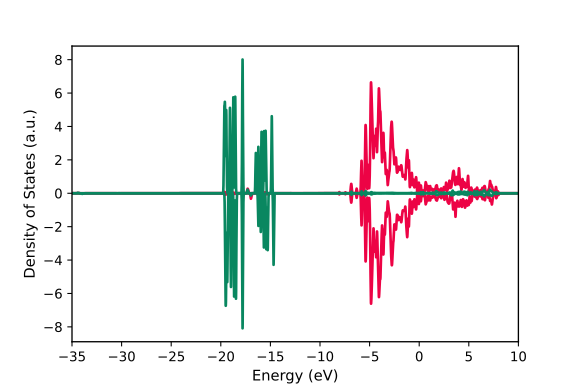
One figure, one DOSCAR, multiple lines, modify the plot.json like this:
{
  "width":6,
  "height": 4,
  "fontsize": 10,
  "xlim": [-35, 10],
  "dos_file": ["DOSCAR-test"],
  "pos_file": ["CONTCAR-test"],
  "data": {"0": [{"atoms":"O", "orbitals": ["p"], "color": "#ed0345"},
                 {"atoms":"O", "orbitals": ["s"], "color": "#098760"}]}
}
The figure is like this:
use fill method
You can also plot the dos in fill format, and the alpha argument is also accepted.
{
  "width":6,
  "height": 4,
  "fontsize": 10,
  "xlim": [-0.5, 0],
  "dos_file": ["DOSCAR_dos"],
  "pos_file": ["CONTCAR_dos"],
  "data": {
    "0": [{"atoms":["C"],"color": "b", "orbitals":["s", "p"],"method": "fill", "alpha": 0.3},
          {"atoms":["H"],"color": "g", "orbitals":["s", "p"],"method": "fill", "alpha": 0.3}]}
}
The figure is like this:

specify legends
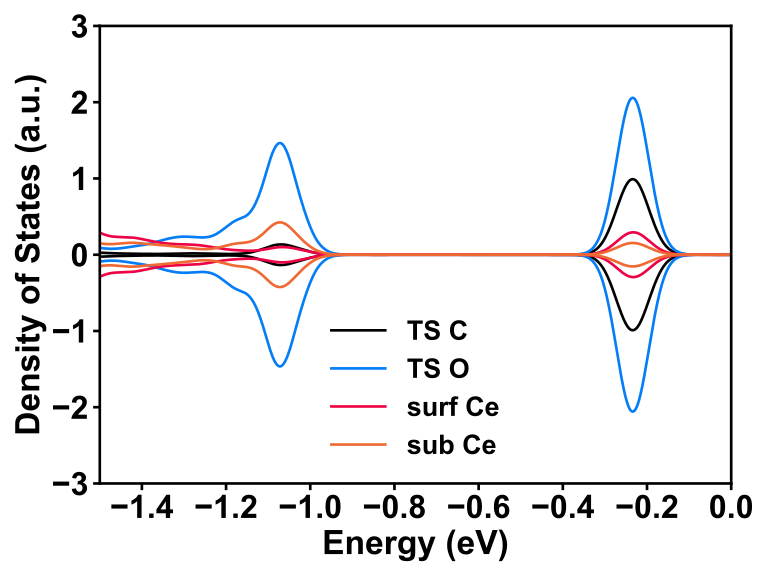
You can specify the legends like this:
{
  "width": 8,
  "height": 6,
  "bwidth": 2,
  "weight": "bold",
  "fontsize": 22,
  "xlim": [-1.5, 0],
  "ylim": [-3, 3],
  "dos_file": ["DOSCAR_clean_TS2"],
  "pos_file": ["CONTCAR_clean_TS2"],
  "data": {
    "0": [{"atoms":["C"],"color": "#000000","method": "line","label": "TS C"},
          {"atoms":[68],"color": "#047df6","method": "line","label": "TS O"},
          {"atoms":[23],"color": "#ed0345","method": "line","label": "surf Ce"},
          {"atoms":[22],"color": "#ef6932","method": "line","label": "sub Ce"}]}
}
The figure is like this:
multiple files
Not enough, if you want to compare different structures, you can modify the plot.json like this
{
  "width":6,
  "height": 4,
  "fontsize": 10,
  "xlim": [-35, 10],
  "dos_file": ["DOSCAR-test", "DOSCAR-test2"],
  "pos_file": ["CONTCAR-test", "CONTCAR-test2"],
  "data": {"0": [{"atoms":"O", "orbitals": ["p"], "color": "#ed0345"}],
           "1": [{"atoms":"O", "orbitals": ["p"], "color": "#098760"}]}
}
DOS align
In some cases, if you want to compare two or more DOS, aligning the energy levels is important to understand the difference between two systems. Usually, we select the innermost orbital of one bulk atom, e.g., bulk O atom, 2s orbital, as the reference energy level to align two or more systems. Now, GVasp can automatically perform such process and the plot.json should include the align items, like this
{
  "width":6,
  "height": 4,
  "fontsize": 10,
  "xlim": [-35, 10],
  "dos_file": ["DOSCAR-test", "DOSCAR-test2"],
  "pos_file": ["CONTCAR-test", "CONTCAR-test2"],
  "align": [(78, "s"), (81, "s")],
  "data": {"0": [{"atoms":"O", "orbitals": ["p"], "color": "#ed0345"}],
           "1": [{"atoms":"O", "orbitals": ["p"], "color": "#098760"}]}
}
It’s still very simple, what you need to do is modify the plot.json, run the command again, then you got it ~~
Important
The default DOSCAR format is regulated by setting the LORBIT=12 in INCAR, so if your LORBIT in INCAR is not 11 or 12, please add “LORBIT”: 10 in the plot.json.