态密度绘制
态密度(DOS)对于理解固体材料的电子结构十分重要,使用 GVasp 可以很容易的进行绘制。
简单的例子
首先,我们从 Total DOS 的绘制说起,用户需要提供 DOSCAR 和 CONTCAR 文件,然后运行下述命令:
gvasp plot dos -j plot.json --save
绘制的态密度图类似这样:
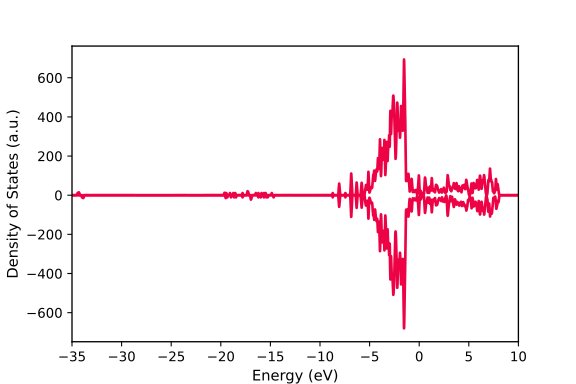
plot.json 如下所示:
{
  "width":6,
  "height": 4,
  "fontsize": 10,
  "xlim": [-35, 10],
  "dos_file": ["DOSCAR-test"],
  "pos_file": ["CONTCAR-test"],
  "data": {"0": [{"color": "#ed0345"}]}
}
可以看到, plot.json 中添加了很多参数,但是只有 dos_file, pos_file 和 data 是必须的。
dos_file: 代表
DOSCAR的位置(必须是列表)pos_file: 代表
CONTCAR的位置(必须是列表)data: 字典格式,key 是 要绘制的 DOSCAR 在
dos_file中的索引序号,值是一个列表,每一个元素代表态密度图中将要绘制的一条线
备注
dos_file 和 pos_file 必须长度一样
因此,对于这一简单的列子,我们仅增加了一个 color 参数来控制线的颜色。
原子投影态密度
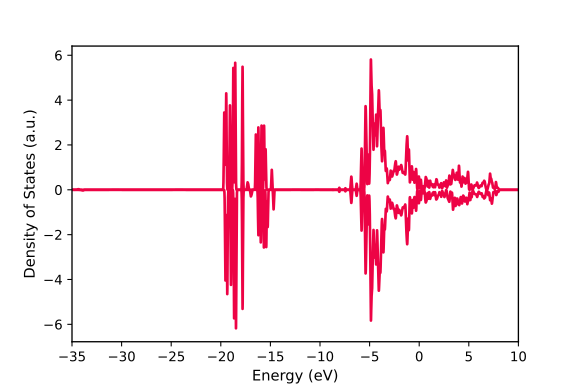
我们想绘制原子投影的态密度, plot.json 示例如下:
{
  "width":6,
  "height": 4,
  "fontsize": 10,
  "xlim": [-35, 10],
  "dos_file": ["DOSCAR-test"],
  "pos_file": ["CONTCAR-test"],
  "data": {"0": [{"atoms":[1, 2, 3, 4, 5], "color": "#ed0345"}]}
}
绘制的态密度图类似这样:
事实上,如果我们要绘制的原子列表是连续的,可以使用 原子语法糖 来指定,类似这样:
{
  "width":6,
  "height": 4,
  "fontsize": 10,
  "xlim": [-35, 10],
  "dos_file": ["DOSCAR-test"],
  "pos_file": ["CONTCAR-test"],
  "data": {"0": [{"atoms":"1-5", "color": "#ed0345"}]}
}
特别是,如果我们想绘制某一元素的所有原子,也可以使用类似这样的 原子语法糖 来指定:
{
  "width":6,
  "height": 4,
  "fontsize": 10,
  "xlim": [-35, 10],
  "dos_file": ["DOSCAR-test"],
  "pos_file": ["CONTCAR-test"],
  "data": {"0": [{"atoms":"O", "color": "#ed0345"}]}
}
同时指定多种元素现在也是支持的,类似这样:
{
  "width":6,
  "height": 4,
  "fontsize": 10,
  "xlim": [-35, 10],
  "dos_file": ["DOSCAR-test"],
  "pos_file": ["CONTCAR-test"],
  "data": {"0": [{"atoms":["O", "Ce"], "color": "#ed0345"}]}
}
如果你还想将态密度分解到原子轨带上,那么需要额外增加一个 orbitals 参数,类似这样:
{
  "width":6,
  "height": 4,
  "fontsize": 10,
  "xlim": [-35, 10],
  "dos_file": ["DOSCAR-test"],
  "pos_file": ["CONTCAR-test"],
  "data": {"0": [{"atoms":"O", "orbitals": ["p"], "color": "#ed0345"}]}
}
同一文件多态密度图绘制
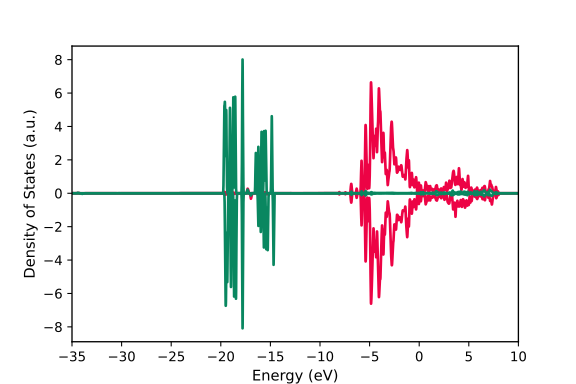
如果想在一张图上针对一个 DOSCAR 体系绘制多条态密度线,修改 plot.json 如下:
{
  "width":6,
  "height": 4,
  "fontsize": 10,
  "xlim": [-35, 10],
  "dos_file": ["DOSCAR-test"],
  "pos_file": ["CONTCAR-test"],
  "data": {"0": [{"atoms":"O", "orbitals": ["p"], "color": "#ed0345"},
                 {"atoms":"O", "orbitals": ["s"], "color": "#098760"}]}
}
绘制的态密度图类似这样:
使用填充方法
你也可以使用填充格式来绘制态密度,alpha参数对于该种绘制风格同样是支持的。
{
  "width":6,
  "height": 4,
  "fontsize": 10,
  "xlim": [-0.5, 0],
  "dos_file": ["DOSCAR_dos"],
  "pos_file": ["CONTCAR_dos"],
  "data": {
    "0": [{"atoms":["C"],"color": "b", "orbitals":["s", "p"],"method": "fill", "alpha": 0.3},
          {"atoms":["H"],"color": "g", "orbitals":["s", "p"],"method": "fill", "alpha": 0.3}]}
}
绘制的态密度图类似这样:

specify legends
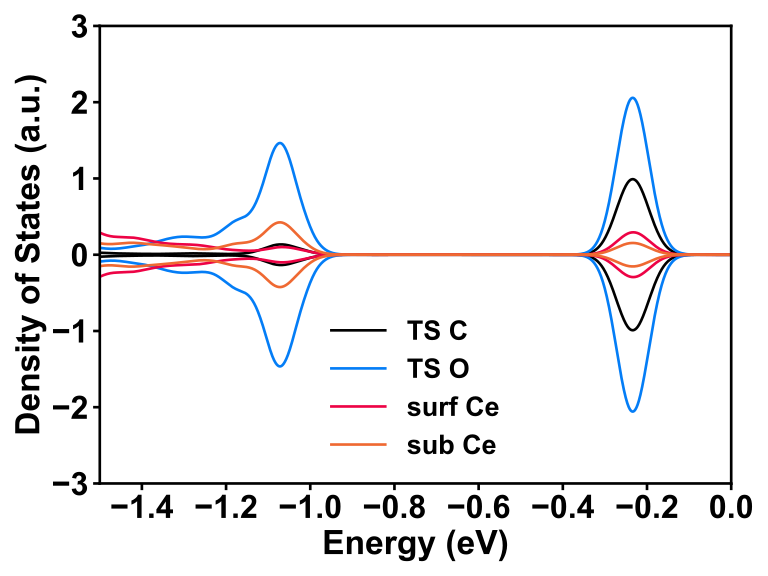
You can specify the legends like this:
{
  "width": 8,
  "height": 6,
  "bwidth": 2,
  "weight": "bold",
  "fontsize": 22,
  "xlim": [-1.5, 0],
  "ylim": [-3, 3],
  "dos_file": ["DOSCAR_clean_TS2"],
  "pos_file": ["CONTCAR_clean_TS2"],
  "data": {
    "0": [{"atoms":["C"],"color": "#000000","method": "line","label": "TS C"},
          {"atoms":[68],"color": "#047df6","method": "line","label": "TS O"},
          {"atoms":[23],"color": "#ed0345","method": "line","label": "surf Ce"},
          {"atoms":[22],"color": "#ef6932","method": "line","label": "sub Ce"}]}
}
绘制的态密度图类似这样:
多文件态密度图绘制
如果你想在一张图上比较不同结构的态密度图,可以修改 plot.json 如下:
{
  "width":6,
  "height": 4,
  "fontsize": 10,
  "xlim": [-35, 10],
  "dos_file": ["DOSCAR-test", "DOSCAR-test2"],
  "pos_file": ["CONTCAR-test", "CONTCAR-test2"],
  "data": {"0": [{"atoms":"O", "orbitals": ["p"], "color": "#ed0345"}],
           "1": [{"atoms":"O", "orbitals": ["p"], "color": "#098760"}]}
}
DOS align
In some cases, if you want to compare two or more DOS, aligning the energy levels is important to understand the difference between two systems. Usually, we select the innermost orbital of one bulk atom, e.g., bulk O atom, 2s orbital, as the reference energy level to align two or more systems. Now, GVasp can automatically perform such process and the plot.json should include the align items, like this
{
  "width":6,
  "height": 4,
  "fontsize": 10,
  "xlim": [-35, 10],
  "dos_file": ["DOSCAR-test", "DOSCAR-test2"],
  "pos_file": ["CONTCAR-test", "CONTCAR-test2"],
  "align": [(78, "s"), (81, "s")],
  "data": {"0": [{"atoms":"O", "orbitals": ["p"], "color": "#ed0345"}],
           "1": [{"atoms":"O", "orbitals": ["p"], "color": "#098760"}]}
}
仍然是非常简单的,核心步骤就是根据需要修改 plot.json ,然后重新运行命令,之后就大功告成了~~
重要
默认生成的 DOSCAR 格式是按照 INCAR 中设置 LORBIT=12 来生成的,因此如果你 INCAR 中 LORBIT 的设置不是 11 或 12,请在 plot.json 中添加 “LORBIT”: 10 来说明。